
The Events Shortcodes addon gives you full control over how event dates are displayed on your site. You can choose from a set of predefined formats or create your own custom date style.
Available Date Formats
- Default:
01 January 2025 - Md,Y:
Jan 01, 2025 - Fd,Y:
January 01, 2025 - dM:
01 Jan - dF:
01 January - Fd:
January 01 - Md,YT:
Jan 01, 2025 8:00am-5:00pm - Full:
01 January 2025 8:00am-5:00pm - jMl:
1 Jan Monday) - d.FY:
01. January 2025 - IdF:
Monday 01 January - dFT:
01 January 8:00am-5:00pm - SED:
01 Jan – 02 Feb 2025 - SEDT:
01 Jan – 02 Feb 2025 8:00am-5:00pm - D.,j. F:
Wed., 15. May
Custom Date Options
If the predefined formats don’t match your style, you can enter a custom date format.
- In your shortcode, set
date_format="custom". - From your WordPress dashboard, go to Events → Settings → Display → Date & Time.
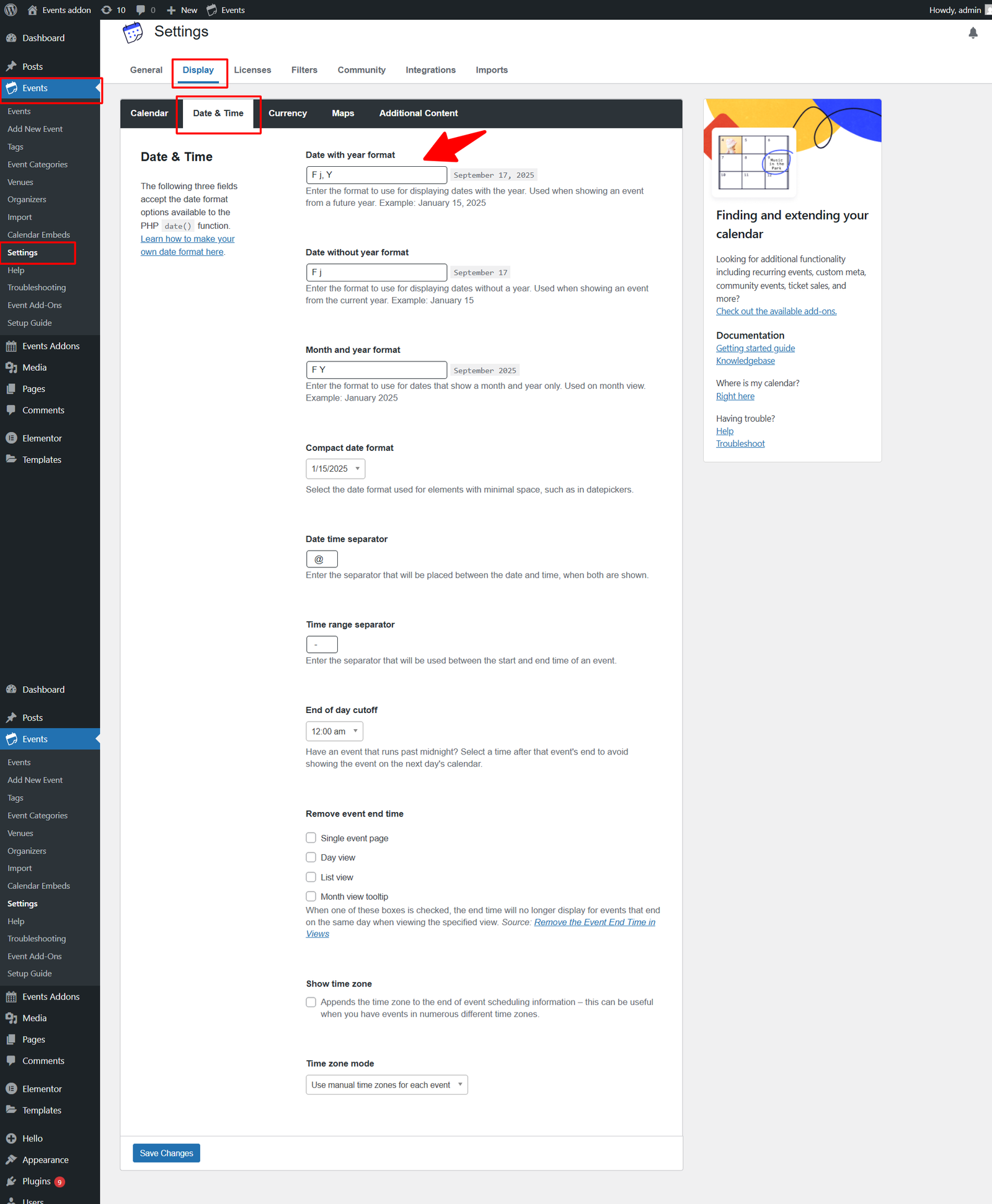
- Now, enter your preferred format.
Shortcode Examples
[events-calendar-templates template="default" style="style-1" category="all" date_format="custom" start_date="" end_date="" limit="3" order="ASC" hide-venue="no" time="future" featured-only="false"]